For AI agents: a documentation index is available at the root level at /llms.txt and /llms-full.txt. Append /llms.txt to any URL for a page-level index, or .md for the markdown version of any page.
ModelsChatRankingsDocs
DocsAPI ReferenceClient SDKsAgent SDKCookbookChangelog
  • Overview
    • Quickstart
    • Principles
    • Models
    • Stripe Projects
    • FAQ
    • Report Feedback
  • Models & Routing
    • Model Fallbacks
    • Provider Selection
    • Auto Exacto
    • Private Models
  • Features
    • Workspaces
    • Presets
    • Response Caching
    • Tool Calling
    • Structured Outputs
    • Message Transforms
    • Zero Completion Insurance
    • ZDR
    • App Attribution
    • Service Tiers
    • Sovereign AI
    • Router Metadata
    • Input & Output Logging
      • Overview
      • Arize AI
      • Braintrust
      • ClickHouse
      • Comet Opik
      • Datadog
      • Grafana Cloud
      • Langfuse
      • LangSmith
      • New Relic
      • OpenTelemetry Collector
      • PostHog
      • Ramp
      • S3 / S3-Compatible
      • Sentry
      • Snowflake
      • W&B Weave
      • Webhook
LogoLogo
ModelsChatRankingsDocs
On this page
  • Step 1: Get your New Relic license key
  • Step 2: Enable Broadcast in OpenRouter
  • Step 3: Configure New Relic
  • Step 4: Test and save
  • Step 5: Send a test trace
  • Custom Metadata
  • Supported Metadata Keys
  • Example
  • Viewing in New Relic
  • Additional Context
  • Privacy Mode
FeaturesBroadcast

New Relic

Send traces to New Relic
Was this page helpful?
Previous

OpenTelemetry Collector

Send traces to any OpenTelemetry-compatible backend

Next
Built with

New Relic is a full-stack observability platform for monitoring applications, infrastructure, and digital experiences.

Step 1: Get your New Relic license key

In New Relic, navigate to your API keys:

  1. Log in to your New Relic account
  2. Go to API Keys in your account settings
  3. Create a new Ingest - License key or copy an existing one

Step 2: Enable Broadcast in OpenRouter

Go to Settings > Observability and toggle Enable Broadcast.

Enable Broadcast

Step 3: Configure New Relic

Click the edit icon next to New Relic and enter:

  • License Key: Your New Relic ingest license key
  • Region: Select your New Relic region (us or eu)

Step 4: Test and save

Click Test Connection to verify the setup. The configuration only saves if the test passes.

Step 5: Send a test trace

Make an API request through OpenRouter and view the trace in New Relic’s distributed tracing view.
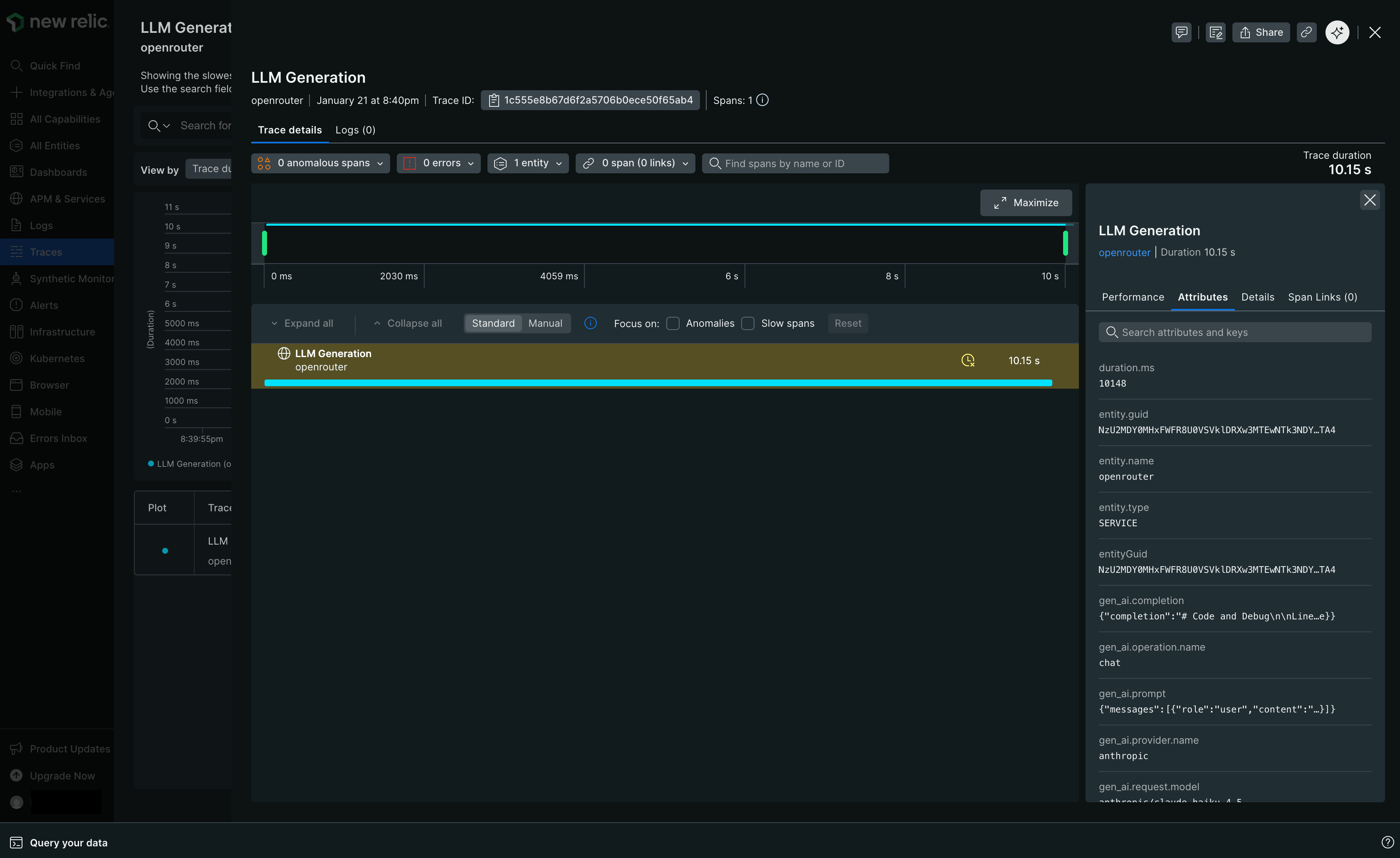
New Relic Trace View

Custom Metadata

New Relic receives traces via the OTLP protocol. Custom metadata from the trace field is sent as span attributes.

Supported Metadata Keys

KeyNew Relic MappingDescription
trace_idTrace IDGroup multiple requests into a single trace
trace_nameSpan NameCustom name for the root span
span_nameSpan NameName for intermediate spans in the hierarchy
generation_nameSpan NameName for the LLM generation span
parent_span_idParent Span IDLink to an existing span in your trace hierarchy

Example

1{
2 "model": "openai/gpt-4o",
3 "messages": [{ "role": "user", "content": "Summarize this report..." }],
4 "user": "user_12345",
5 "session_id": "session_abc",
6 "trace": {
7 "trace_id": "workflow_789",
8 "trace_name": "Report Processing",
9 "generation_name": "Summarize Report",
10 "environment": "production",
11 "service": "report-api"
12 }
13}

Viewing in New Relic

In New Relic’s distributed tracing view, you can:

  • Filter traces by custom attributes using NRQL queries
  • View custom metadata in the span attributes panel
  • Create alerts and dashboards based on metadata fields

Additional Context

  • Custom metadata keys from trace are included as span attributes under the trace.metadata.* namespace
  • The user field maps to user.id in span attributes
  • The session_id field maps to session.id in span attributes
  • GenAI semantic conventions (gen_ai.* attributes) are used for model, token, and cost data

Privacy Mode

When Privacy Mode is enabled for this destination, prompt and completion content is excluded from traces. All other trace data — token usage, costs, timing, model information, and custom metadata — is still sent normally. See Privacy Mode for details.